

How Search Generative Experience Is Reshaping SEO Strategies
 Oct 5, 2026 Jul 13, 2026
Your website is more than a collection of pages. It is a connected system that helps visitors find information while making it easier for search engines to understand your content. A well-planned website architecture combined with a strategic internal linking structure improves user experience, strengthens SEO performance, and increases conversions.
Whether you manage a small business website or a large enterprise platform, organizing your content correctly can significantly improve your online visibility. If your pages are difficult to find, disconnected, or poorly structured, both users and search engines may struggle to navigate your website.
This guide explains how you can create an effective website architecture and internal linking strategy that supports long-term SEO success.
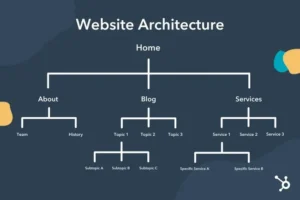
Website architecture refers to the way your pages are organized and connected. It creates a logical structure that allows users and search engines to move through your website efficiently.
A strong website architecture helps you:
When your website follows a logical hierarchy, visitors can quickly find the information they need without frustration.
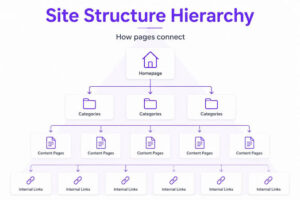
Think of your website like a well-organized library.
Your homepage should introduce your primary services or products, followed by category pages, service pages, blog articles, and supporting resources.
A simple structure might look like this:
Home
↓
Services
↓
Individual Service Pages
↓
Supporting Blog Content
↓
FAQs and Resources
Keeping important pages within three to four clicks from the homepage helps both visitors and search engines discover your content faster.
Instead of publishing unrelated content, organize your website around core topics.
For example, if your business offers SEO services, create a primary service page supported by multiple related blog articles covering specific subtopics.
This approach builds topical authority while creating multiple opportunities for internal linking.
Examples include:
Each supporting article should naturally connect back to the main service page.
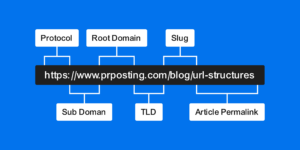
Clean URLs improve both usability and SEO.
Good examples include:
Avoid unnecessary numbers, symbols, or long parameter strings.
Short, descriptive URLs help users understand page content before clicking.
Breadcrumbs provide another navigation path for visitors.
For example:
Home > Services > SEO > Website Architecture
Breadcrumbs improve user experience while helping search engines understand page relationships.
They also reduce navigation friction for users exploring multiple pages.
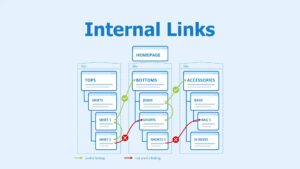
Internal links connect one page on your website to another.
Unlike backlinks from external websites, internal links are completely under your control.
They help:
A thoughtful internal linking strategy strengthens every section of your website.
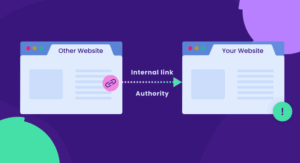
Pages with strong traffic or backlinks can pass authority to other pages.
For example, your homepage often receives the most authority.
Use internal links from high-performing pages to:
This helps search engines recognize the importance of those pages.
Avoid generic phrases like:
Instead, use descriptive anchor text that clearly explains the destination page.
For example:
If you want professional SEO solutions, explore the comprehensive services offered by Apex SEO Company.
Descriptive anchor text improves accessibility while providing stronger contextual signals to search engines.
Every blog should connect readers to additional useful resources.
For example, an article about website architecture could link to pages discussing:
Only include links where they genuinely help readers continue learning.
Avoid forcing unnecessary links into unrelated paragraphs.
An orphan page has no internal links pointing toward it.
Even high-quality content may remain undiscovered if search engines cannot easily find it.
Review your website regularly to ensure every important page receives links from relevant pages.
Too many navigation options overwhelm users.
Your primary menu should focus on your most valuable pages.
Common navigation sections include:
Simple navigation improves usability while helping search engines prioritize important content.
The footer provides another opportunity for internal linking.
Include links to:
Avoid stuffing dozens of unnecessary links into the footer.
Keep it organized and user-friendly.
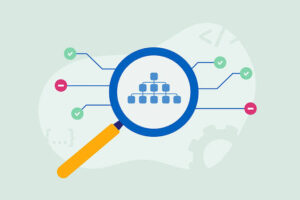
Search engine bots have limited crawl resources.
A logical architecture helps crawlers discover important pages quickly.
Best practices include:
Efficient crawling improves indexing and visibility.
Your internal links should match the visitor’s journey.
Someone reading educational content may next need:
Provide helpful next steps instead of ending each page without direction.
This keeps visitors engaged longer.
SEO is an ongoing process.
Review your internal linking strategy regularly using analytics and SEO tools.
Monitor:
Use these insights to strengthen underperforming sections of your website.

Many websites unintentionally reduce SEO performance through poor linking practices.
Avoid:
Quality always outweighs quantity.
If you serve specific cities or regions, organize location pages carefully.
Each location page should include:
Connect these pages through relevant internal links to create strong geographic relevance for search engines.
This structure supports better local rankings and improves user experience for nearby customers.
Website architecture should evolve as your business grows.
Regularly review:
Update internal links whenever new content is published so your entire website remains interconnected.
Building a scalable website architecture requires technical knowledge, strategic planning, and ongoing optimization. Whether you’re launching a new website or improving an existing one, working with Apex SEO Company can help you create a search-friendly structure that supports long-term growth and higher search visibility.
When you’re ready to improve your website’s architecture, strengthen your internal linking strategy, and maximize SEO performance, visit the Contact Us page to discuss your goals with experienced SEO professionals.
Website architecture and internal linking are essential foundations of sustainable SEO success. When you organize your content logically, connect related pages thoughtfully, and prioritize user experience, you create a website that benefits both visitors and search engines.
Continue refining your website as it grows. Every new page should fit naturally into your site’s structure and strengthen your overall content ecosystem. A strategic architecture not only improves rankings but also creates a smoother, more engaging experience that encourages visitors to explore, trust your brand, and take action.
Website architecture is the way your website’s pages are organized and connected. A logical structure helps users navigate easily while allowing search engines to crawl and index your content more efficiently.
Internal links help visitors discover related content, distribute page authority, improve crawlability, and strengthen keyword relevance across your website.
There is no fixed number. Include only relevant links that genuinely help users navigate your website without overwhelming them.
An orphan page has no internal links pointing to it, making it difficult for users and search engines to discover and index.
Review your website architecture every few months or whenever you add new services, blog posts, or landing pages to keep your internal linking strategy effective.
What Role Does Structured Data Play in AI Search?
Sep 21, 2026 How Entity SEO Supports AI Search Visibility
Sep 7, 2026