

Technical SEO Guide: Optimize Your Website for Better Search Engine Rankings
 Oct 26, 2026 Jul 27, 2026
A well-configured robots.txt file plays a critical role in your website’s technical SEO. While it does not directly improve rankings, it helps search engine crawlers focus on your most valuable pages instead of wasting crawl resources on low-priority or duplicate content. When you understand how robots.txt works, you can improve your website’s crawl efficiency, protect sensitive areas, and support better indexation.
If you want your website to perform well in AI-powered search, traditional search engines, and local search results, you should include robots.txt optimization as part of your technical SEO strategy. Proper crawl management helps search engines discover your important pages faster while avoiding unnecessary crawling of pages that provide little SEO value.
Whether you manage a small business website, an eCommerce store, or a large enterprise platform, learning how to configure robots.txt correctly helps you build a stronger SEO foundation.

A robots.txt file is a simple text file located in the root directory of your website. It provides instructions to search engine bots about which parts of your website they may or may not crawl.
For example, you can:
It is important to understand that robots.txt controls crawling—not indexing. A page blocked by robots.txt may still appear in search results if other websites link to it.
Search engines allocate a crawl budget to every website. Larger websites with thousands of pages especially benefit from effective crawl management.
When your crawl budget is used efficiently, search engines can:
Good crawl management becomes even more important if your website contains:
By managing these areas properly, you help search engines focus on content that deserves visibility.

When a search engine visits your website, one of the first files it requests is robots.txt.
The crawler reads the file and follows the instructions if it respects the Robots Exclusion Protocol.
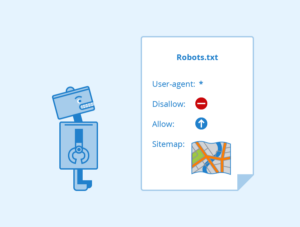
A basic robots.txt file usually contains:
Example:
User-agent: *
Disallow: /admin/
Disallow: /private/
Allow: /
Sitemap: https://yourdomain.com/sitemap.xml
This tells most search engine crawlers to avoid the admin and private folders while allowing access to the rest of the website.
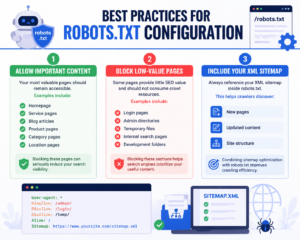
Your most valuable pages should remain accessible.
Examples include:
Blocking these pages can seriously reduce your search visibility.
Some pages provide little SEO value and should not consume crawl resources.
Examples include:
Blocking these sections helps search engines prioritize your useful content.
Always reference your XML sitemap inside robots.txt.
This helps crawlers discover:
Combining sitemap optimization with robots.txt improves crawling efficiency.

Modern search engines render websites similarly to browsers.
Blocking CSS or JavaScript can prevent search engines from understanding:
Unless absolutely necessary, allow these resources to be crawled.
Avoid overly broad blocking rules.
For example:
Disallow: /
This blocks your entire website from crawling.
Instead, target only folders or URLs that truly need restriction.
Many websites accidentally damage their SEO through incorrect robots.txt settings.
Some common mistakes include:
Developers often block websites during staging.
If the same rule remains after launch, search engines cannot crawl the site.
Sometimes important service pages or blog categories are accidentally restricted.
Regular audits help prevent this issue.
Robots.txt stops crawling.
It does not guarantee removal from search results.
If your goal is preventing indexing, use the appropriate indexing directives where supported rather than relying solely on robots.txt.
As websites grow, robots.txt should evolve.
Review it whenever you:
Efficient crawl management goes beyond robots.txt.
You should also:
Together, these improvements help search engines crawl your website more efficiently.
AI-powered search engines rely on high-quality, crawlable content.
Proper robots.txt configuration helps AI systems:
As AI search continues evolving, technical SEO becomes increasingly important.
A clean crawl path supports better visibility across AI search experiences.
Local businesses often maintain multiple location pages.
Good crawl management ensures search engines can easily discover:
If you operate in several locations, avoid accidentally blocking location-specific directories.
Strong technical SEO supports stronger local rankings.
You should review robots.txt whenever you:
Routine technical audits help identify crawl issues before they affect rankings.
Robots.txt configuration seems simple, but mistakes can reduce your website’s visibility significantly.
Working with an experienced Apex SEO Company ensures your robots.txt file supports your overall SEO strategy while improving crawl efficiency, indexing, AI visibility, and long-term search performance. Professional technical SEO audits also identify hidden crawl issues that may limit your organic growth.
Beyond robots.txt optimization, experts evaluate website architecture, internal linking, Core Web Vitals, structured data, XML sitemaps, crawl budget, and indexing health to create a complete technical SEO strategy.
Your robots.txt file is one of the first documents search engines read when visiting your website. Proper configuration improves crawl efficiency, protects unnecessary pages, and helps search engines focus on your most valuable content.
Combined with optimized internal linking, structured content, XML sitemaps, and quality website architecture, robots.txt becomes an essential part of a successful SEO strategy.
Whether your goal is higher organic rankings, stronger AI search visibility, improved local SEO, or better user experience, effective crawl management supports long-term website growth.
If you want expert guidance on technical SEO, crawl optimization, and website performance improvements, Contact Us to learn how a customized SEO strategy can help your business grow online.
A robots.txt file tells search engine crawlers which areas of your website they should or should not crawl, helping improve crawl efficiency.
No. Robots.txt blocks crawling, not necessarily indexing. Pages may still appear in search results if other websites link to them.
Yes. Even a simple robots.txt file helps guide search engine crawlers and supports better technical SEO management.
Review it after website redesigns, migrations, major content updates, or whenever you notice crawling or indexing issues.
It ensures search engines can efficiently crawl important location pages while avoiding low-value sections, improving visibility in local search results.